
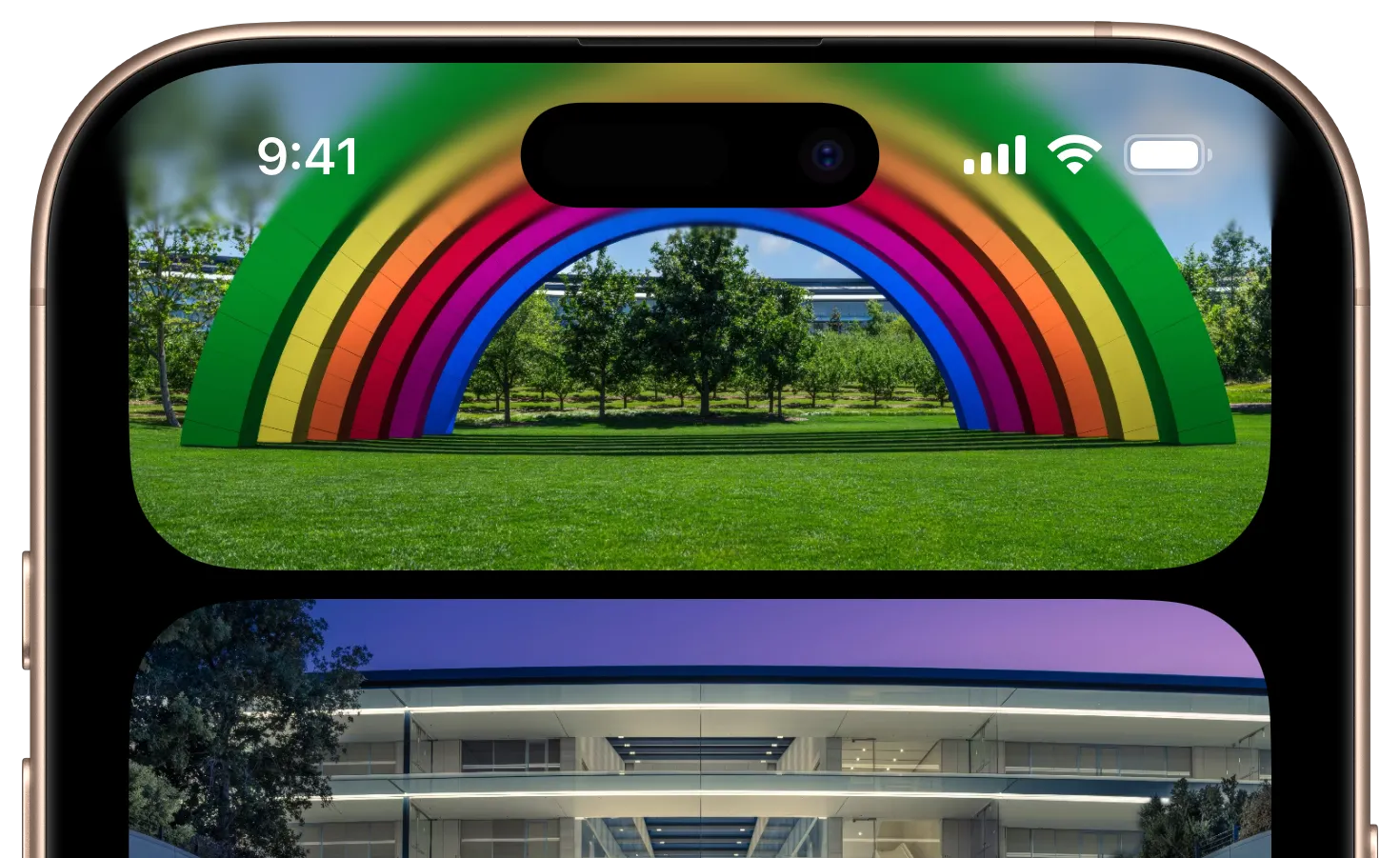




BlurUIKit is an open source UI framework that exposes more of the dynamic blur capabilities of UIKit in an App Store safe way. Namely, it exposes the 'progressive blur' effect Apple has started using in system apps where underlaying content gets progressively more blurry along a gradient pattern. It also exposes the ability to apply gaussian blurs directly to live UIView objects, useful for dynamic blur-fade transitions.
- Adds an extension on
UIViewto enable real time gaussian blurs on live view content. - Enables the ability to add a progressive blur gradient under areas that require higher contrast between layers.
- Adds a reflection view for showing a blurred, flipped mirror of on-screen content (Useful for the new split mode on iPhone Duo.)
- Allows an optional 'dimming' colored gradient to add additional contrast when needed.
- Dimming and blur gradients can be configured independently.
- Highly optimized to avoid regenerating gradient mask images unless needed.
- SwiftUI support via the
VariableBlurview wrapper. - Adjusts and animates the blur radius and dimming of standard
UIVisualEffectViewinstances.
BlurUIKit features a default configuration ready to use, but can be further modified depending on your app's needs.
// Create a new instance of `VariableBlurView`
let blurView = VariableBlurView()

// Set a tint color for the colored gradient.
blurView.dimmingTintColor = .red

// Extend the clear end of the dimming gradient by 25% of the view's size.
blurView.dimmingClearExtension = .relative(fraction: 0.25)

// Reach maximum blur and full dimming color halfway inside the view.
blurView.blurMaximumRadiusInset = .relative(fraction: 0.5)
blurView.dimmingFullColorInset = .relative(fraction: 0.5)// Use the VariableBlur view with chainable modifiers
VariableBlur(direction: .down)
.dimmingTintColor(.red)
.dimmingClearExtension(.relative(fraction: 0.25))
.blurMaximumRadiusInset(.relative(fraction: 0.5))
.dimmingFullColorInset(.relative(fraction: 0.5))The blur gradient always fills the view, transitioning from minimumBlurRadius to
maximumBlurRadius. blurMaximumRadiusInset moves the point where maximum blur is
reached inward from the maximum-radius edge; the remaining region stays at maximum blur.
The dimming gradient independently transitions from clear to dimmingTintColor, with
dimmingAlpha applied to its overall opacity. dimmingFullColorInset moves its full-color
point inward, while dimmingClearExtension stretches only its clear end outside the view.
Relative values for both use the original view bounds. Dimming extension does not enlarge
the blur backdrop; the view and its ancestors must allow overflow to display it.
Another feature of BlurUIKit is being able to apply gaussian blur to UIView instances.
This is different to UIVisualEffectView in that only the view itself is blurred, leaving
any content visible underneath the view unchanged.
// Create a new UIView instance
let redSquare = UIView(frame: CGRect(x: 0, y: 0, width: 100, height: 100))
redSquare.backgroundColor = .systemRed

// Apply gaussian blur to it
redSquare.blurRadius = 30.0

// Animate it away
redSquare.setBlurRadiusAnimated(radius: 0, duration: 0.6)

// Or hold the blur for a moment first, then animate it away
redSquare.setBlurRadiusAnimated(radius: 0, duration: 0.6, delay: 0.3)BlurUIKit can also adjust a standard UIVisualEffectView in place: the radius of its UIBlurEffect,
and the opacity of the tint UIKit draws over the blur. Both are plain properties that animate when set
inside a UIView.animate block, so content behind a dialog can come back into focus as the dialog goes away.
The rest of the effect follows the radius. Below UIKit's default, the saturation boost and other filters UIKit pairs with its blur scale back in proportion and the backdrop is captured at a higher resolution, so a few points reads as a crisp depth-of-field blur and zero looks like no effect at all.
// Softly blur and dim the content behind a dialog
let backdrop = UIVisualEffectView(effect: UIBlurEffect(style: .regular))
backdrop.blurEffectRadius = 6   // In points. UIKit's default for this style is 20 to 30.
backdrop.dimmingAlpha = 0.5     // 1 is UIKit's own tint, 0 is just the blur.

// Bring the content back into focus alongside the dialog's own animation
UIView.animate(withDuration: 0.5) {
    dialog.alpha = 0
    backdrop.blurEffectRadius = 0
    backdrop.dimmingAlpha = 0
}BlurUIKit requires iOS 15 or later and Swift 6 (Xcode 16 or later).
Manual Installation
Copy the contents of the BlurUIKit folder to your app's project folder.
CocoaPods
# UIKit only (default)
pod 'BlurUIKit'

# Include SwiftUI support
pod 'BlurUIKit/SwiftUI'
Swift Package Manager
Add the following to your Package.swift:
dependencies: [
  // ...
  .package(url: "https://github.com/TimOliver/BlurUIKit.git", from: "1.6.0"),
],
Then add the target dependency you need:
// UIKit only
.product(name: "BlurUIKit", package: "BlurUIKit")

// SwiftUI support
.product(name: "BlurSwiftUI", package: "BlurUIKit")Open BlurUIKit.xcodeproj, select the BlurUIKitExample scheme and an iOS simulator,
then press ⌘U. The shared BlurUIKit test plan runs the unit and rendering tests
together with code coverage enabled. Open the latest test run in Xcode's Report
navigator (⌘9) and select Coverage to inspect coverage under BlurUIKitExample.
The example app compiles the library sources directly, so both suites contribute to
the same coverage entries.
The unit test files are shared with the Swift package's BlurUIKitTests target.
CI also compiles them against the separate BlurUIKit and BlurSwiftUI package modules
to verify package integration, without executing the shared tests a second time.
Rendering tests require the example app as their host and are excluded from the package target.
tl;dr Yes, it should be 99.9% safe for the App Store. If your app gets rejected from this library, please open an issue.
While obviously you should always use the public APIs that Apple provides to you, there is definitely a 'gray' area in iOS where you can extend the functionality of public APIs, without doing anything unsafely.
Apple has historically said the reason they don't like developers using private APIs is that they make no guarantees between major iOS versions that anything under the hood will stay consistent. This primarily applies to ultra-brazen things like dynamically linking to private frameworks. Conversely, even small, innocent things such as traversing the subviews of one of Apple's UI components and moving them around internally (like I did with TONavigationBar) could be considered using a private API if the inner views aren't public.
BlurUIKit is in a similar camp to traversing the inner views of an Apple UI component in terms of private API use. It takes advantage of the fact that CAFilter is actually exposed publicly on a public property of UIVisualEffectView, which we can access, and then make in-memory copies for our own use. In this way, we can safely ensure that since we're not doing any internal runtime hacking or risky assumptions to access the object, there's nothing for Apple to detect in App Review (probably).
Obviously, I'm not a huge fan of relying on these sorts of hacks, but I feel like this is a very special case. Not only is it straight-up not possible to achieve this visual effect using only public APIs (SwiftUI aside), but Apple now uses it so heavily in both the Home Screen and in the system apps that the effect is starting to become a part of the iOS visual design language. And so it feels wild to me that they haven't made it a public API yet to let third-party developers achieve the same thing.
In iOS 26, Apple provided a new API on UIScrollView that enables this sort of effect, but the initial feedback I'm hearing from fellow developers is that it's very limiting. You can't change the blur radius or the size of the gradient. As such, it seems that this library still has value, even in iOS 26. It would be amazing if Apple fully exposed this effect as a public API. I've already opened FB13949531 asking them to consider making it as such. The more developers who duplicate that radar, the better chance we have of Apple doing so. If you love this effect as much as I do, please consider duplicating that radar.
BlurUIKit was created by Tim Oliver as a component of iComics.
BlurUIKit is available under the MIT license. Please see the LICENSE file for more information.