Repository navigation
Show state errors in the State Machine view - #159
Open
CatarinaGamboa wants to merge 2 commits into
Open
CatarinaGamboa wants to merge 2 commits into
CatarinaGamboa wants to merge 2 commits into
Conversation


CatarinaGamboa
added a commit
that referenced
this pull request
Oct 24, 2026

## Description
Closes #117.

When the State Machine view is opened from a state refinement error, it
marks the rejected call on the full diagram. There are two sets of
states:
- **P**, the states the receiver can be in, from Found;
- **A**, the states the call accepts, from Expected.

The view marks:
- **Invalid, P \ A**: red outline and **✕**. The call fails from here.
- **Valid, P ∩ A**: green outline and **✓**. The call is fine from here.
- **Accepted but not possible here, A \ P**: a thin dashed yellow
outline and no text. It hints at where the object could be brought.
- **The failed method**: every arrow labelled with it gets a red label,
including inside merged labels. The rejected call is never drawn as a
new transition.

Red and green have a faint fill and yellow is outline only, so a large
machine stays calm.

The full diagram is always shown. Focus mode dims what does not help
with the error:
- states outside P ∪ A;
- constructors;
- every method name that is neither the failed method nor a transition
that moves the receiver out of a state in P to a different state. This
applies to each name inside merged labels: in `getOption / receive /
send / …` only `receive` stays bright.

An arrow's path is dimmed only when all of its names are. "Show all" and
"Focus on error" switch the dimming off and on and keep pan and zoom.
The label text is identical in both modes, so the layout does not move.

A one-line legend shows only the marks that are present: "✕ Call
rejected", "✓ Call allowed" and "Allowed, but not reachable here". In
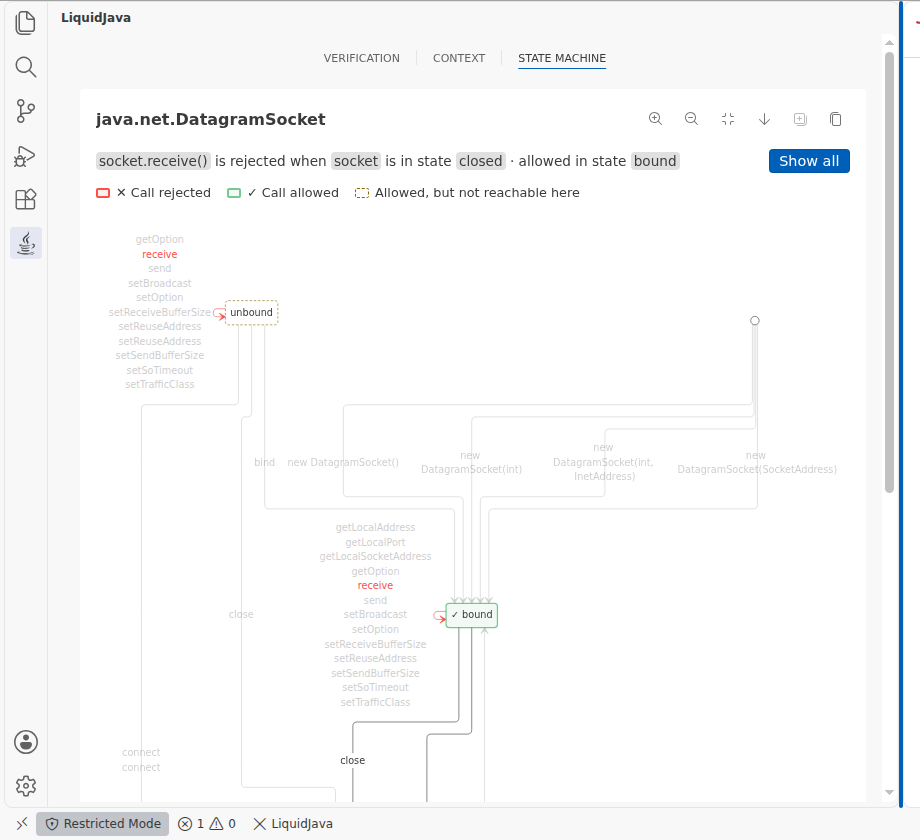
light themes the dashed outline uses a darker warning colour.

One summary line sits above the diagram, e.g. "`socket.receive()` is
rejected when `socket` is in state `closed` · allowed in state `bound`".

**Edge cases**
- When the receiver's state is unknown (every state is possible), only A
is marked, and the summary says the state is unknown.
- With no known receiver or accepted states, or with an older server,
the view behaves as on `main`.

**Data**
- P is `possibleStates` (liquid-java/liquidjava-fsm#11). With an older
server, it falls back to `definiteFoundState` and then `actualStates`.
- A is `expectedStates`.
- **Dependency:** bumps `liquidjava-fsm` to 0.1.5.
- The call is matched by its exact method name from the error context,
not by label text.
- "Copy Mermaid Source" copies the plain diagram.

## Screenshots
These are real verifier output in headless VS Code.

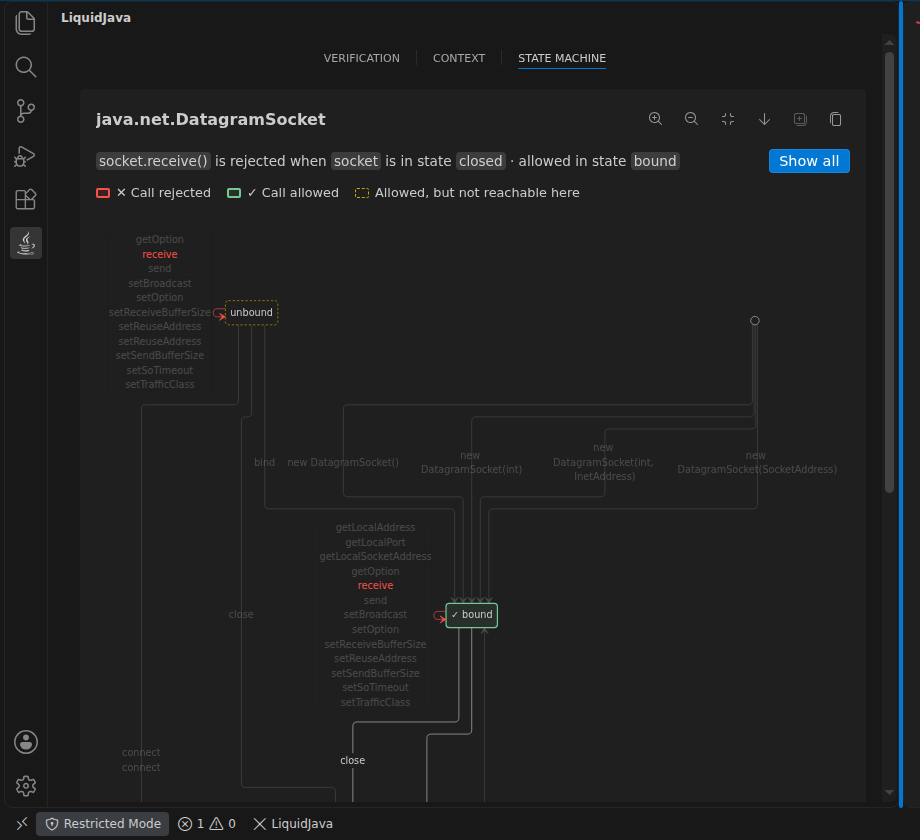
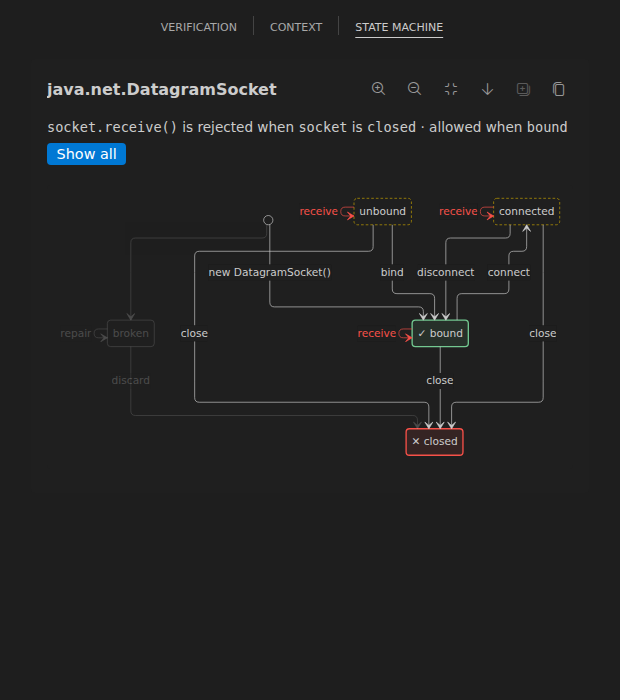
**UDP chat client.** The study example `E_OSS_A1_22_UdpChatClient`:
`receive` after an `if` that may close the socket. In focus mode the
following stay bright:
- `receive`;
- `close` and `connect` out of `bound`;
- the accessors out of `closed`.

The accessors stay bright because the DatagramSocket spec writes `from =
"closed(this) && connected(old(this))"`, which is drawn as an arrow from
`closed` to `connected`. That `old(...)` in a `from` is a spec error,
not an extension issue.

<img width="720" alt="DatagramSocket focus: only receive, close and
connect stay bright"
src="https://raw.githubusercontent.com/liquid-java/vscode-liquidjava/pr-screenshots/158/udp-focus-methods.png"
/>

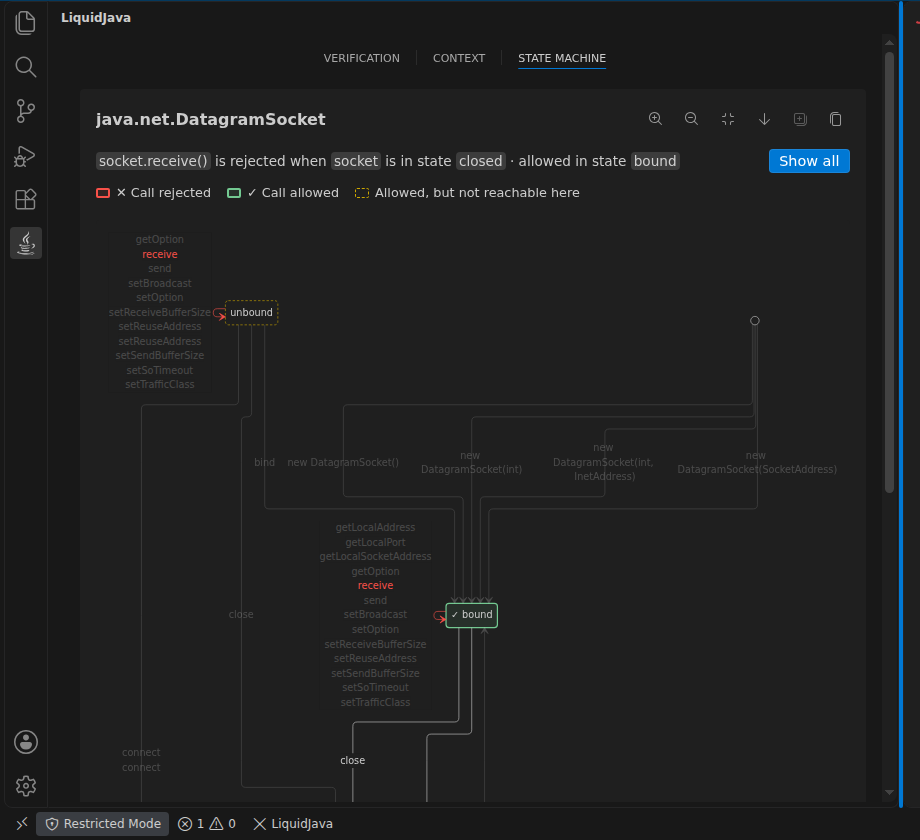
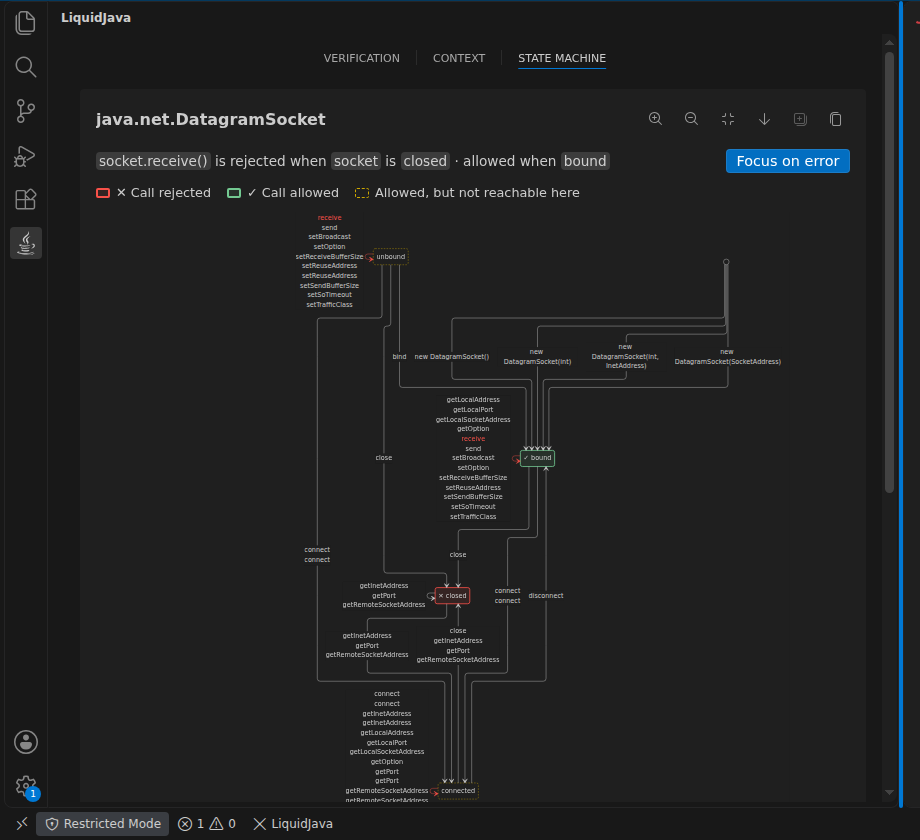
<details><summary>Whole UDP machine: focus in dark and light, and Show
all</summary>

<img width="560" alt="UDP focus, dark"
src="https://raw.githubusercontent.com/liquid-java/vscode-liquidjava/pr-screenshots/158/udp-dark.png"
/> <img width="560" alt="UDP focus, light"
src="https://raw.githubusercontent.com/liquid-java/vscode-liquidjava/pr-screenshots/158/udp-light.png"
/>

<img width="560" alt="UDP Show all"
src="https://raw.githubusercontent.com/liquid-java/vscode-liquidjava/pr-screenshots/158/udp-show-all.png"
/>
</details>

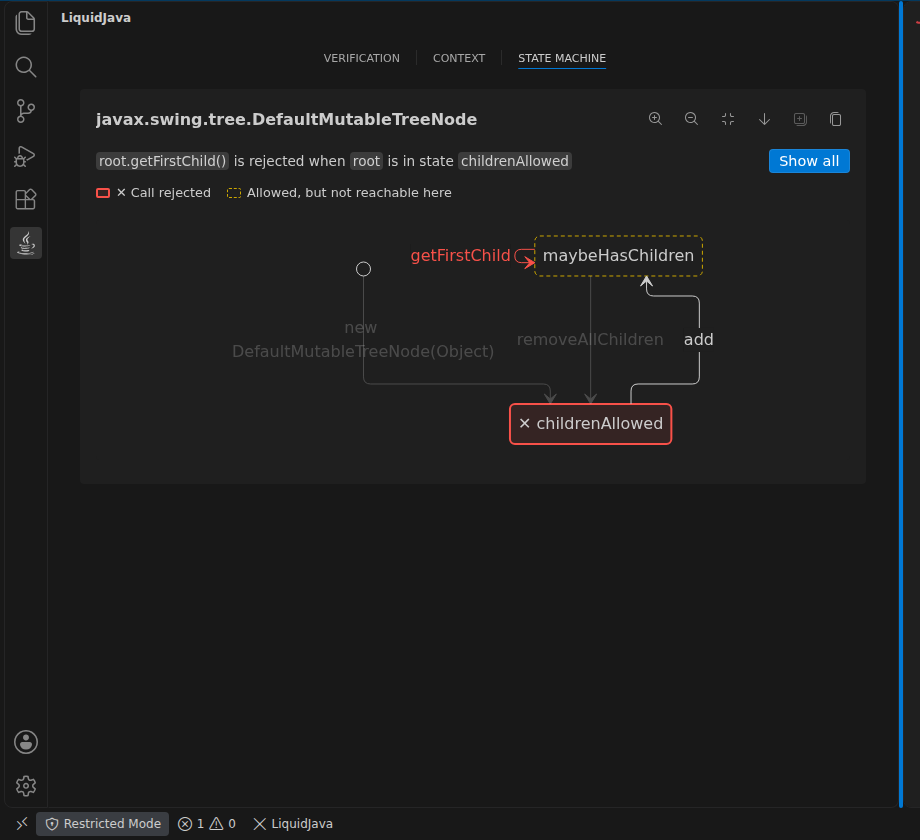
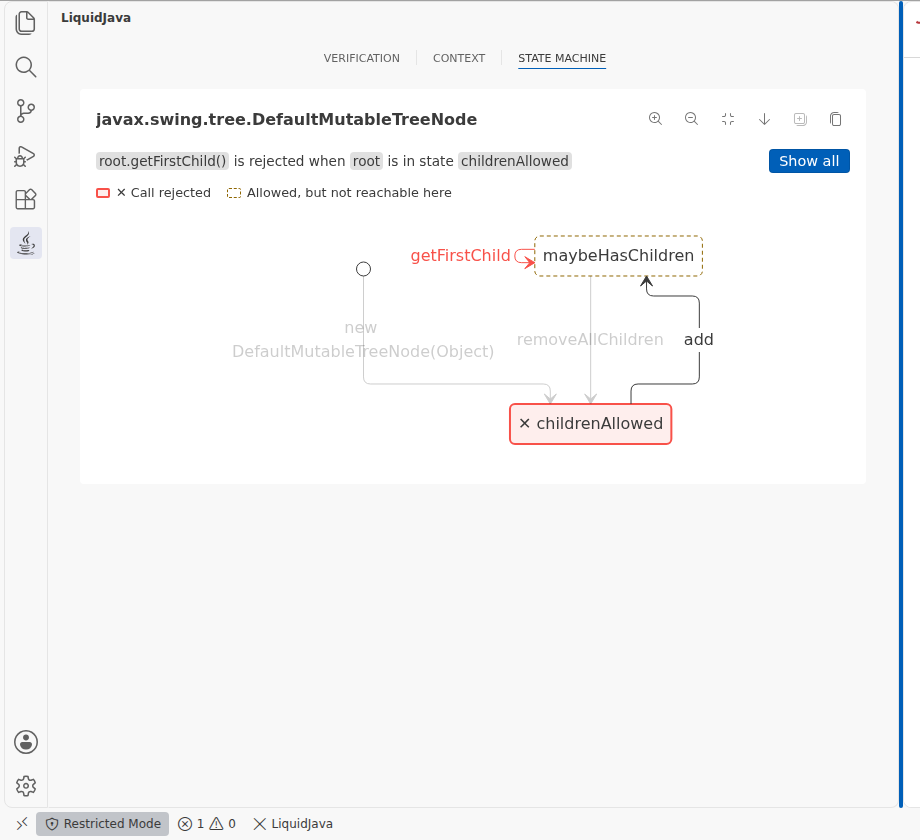
**DefaultMutableTreeNode** (the issue's example). `getFirstChild()`
after `removeAllChildren()`:
- `childrenAllowed` is invalid;
- `maybeHasChildren` is accepted;
- `add`, the way there, stays bright;
- `removeAllChildren` is dimmed.

<img width="560" alt="Tree focus, dark"
src="https://raw.githubusercontent.com/liquid-java/vscode-liquidjava/pr-screenshots/158/tree-dark.png"
/> <img width="560" alt="Tree focus, light"
src="https://raw.githubusercontent.com/liquid-java/vscode-liquidjava/pr-screenshots/158/tree-light.png"
/>

<details><summary>Dimmed unrelated state (simplified demo machine, not a
real class)</summary>

<img width="560" alt="Dimmed unrelated state"
src="https://raw.githubusercontent.com/liquid-java/vscode-liquidjava/pr-screenshots/158/dimming-demo.png"
/>
</details>

## Tests
Run against liquidjava-fsm 0.1.5 and verifier 0.0.35 from Maven Central:
- `npm run lint` and `npm run test:typecheck`: clean.
- `npm run test:unit`: 75 passed in 7 files.
- `npm test` (VS Code): 8 + 1 passing.
- Server `mvn test`: 24 passing.
- Local smoke test: passed.

The new tests cover:
- the split into Valid, Invalid and accepted states;
- the fallbacks and the unknown-state case;
- empty or unknown states;
- exact method matching (`receive` does not match `receiveAll`);
- red labels inside merged labels;
- dimming of rendered paths and labels, per-name dimming inside merged
labels, and the rule for which methods count as useful;
- the legend;
- dimmed constructors;
- diagram clipping below the summary when panned;
- the toggle keeping zoom;
- plain Mermaid copy;
- the computed outline styles.

Independently reviewed twice; all findings were fixed.

## Known limits
- Large machines such as DatagramSocket have long stacked self-loop
labels. This already happens on `main`.
- #159 touches the same webview files; whichever PR merges second will
be rebased.

🤖 Generated with [Claude Code](https://claude.com/claude-code)

---------

Co-authored-by: Claude Opus 5.5 <noreply@anthropic.com>


The tab keeps the last state error shown and follows the error at the cursor,
steps through several errors, counts them on the tab, and links back to the
error in the Verification tab. State errors get a labelled Show in state
machine button and CodeLens.

Co-Authored-By: Claude Opus 5.5 <noreply@anthropic.com>

CatarinaGamboa
force-pushed
the
feat/155-state-errors-in-view
branch
from
October 24, 2026 22:46
9150883 to
31edcee
Compare
CatarinaGamboa
added a commit
that referenced
this pull request
Oct 24, 2026
Count only the state errors of the current file, keep the focus toggle with
the legend apart from View error, and move Show in state machine to the top
of the error.

Co-Authored-By: Claude Opus 5.5 <noreply@anthropic.com>
This file contains hidden or bidirectional Unicode text that may be interpreted or compiled differently than what appears below. To review, open the file in an editor that reveals hidden Unicode characters.
Learn more about bidirectional Unicode characters
Sign up for free
to join this conversation on GitHub.
Already have an account?
Sign in to comment

Add this suggestion to a batch that can be applied as a single commit.This suggestion is invalid because no changes were made to the code.Suggestions cannot be applied while the pull request is closed.Suggestions cannot be applied while viewing a subset of changes.Only one suggestion per line can be applied in a batch.Add this suggestion to a batch that can be applied as a single commit.Applying suggestions on deleted lines is not supported.You must change the existing code in this line in order to create a valid suggestion.Outdated suggestions cannot be applied.This suggestion has been applied or marked resolved.Suggestions cannot be applied from pending reviews.Suggestions cannot be applied on multi-line comments.Suggestions cannot be applied while the pull request is queued to merge.Suggestion cannot be applied right now. Please check back later.
Description
Closes #155.
Makes the State Machine view easy to reach from a state error and keeps the error there. Before, the only way in was a small icon on the error in the Verification tab, and clicking the State Machine tab dropped the error, so getting back meant going through the Verification tab again.
This replaces the earlier version of this PR, which listed the errors beside the diagram. That worked for one error but crowded the view with several, so the view now shows one error at a time.
‹ 1 of 3 ›steps through the state errors of the current file in source order. The stepper only appears with more than one error.of 3in the stepper.type-hierarchyicon on state errors is replaced by a labelled Show in state machine button at the top of the error, below its title.liquidjava.showViewwith an optional'fsm'tab argument.Screenshots
A throwaway copy of the UDP chat client with two more state errors:
bindon a bound socket andconnectafterclose.1. Verification tab. Show in state machine at the top of each state error, the badge on the tab, and the CodeLens in the editor (
State Refinement Error | Show in state machine, cut off at the editor edge here).2. Opening the State Machine tab shows the first error. 3. The next error.
4. After visiting Context and coming back, the same error is still shown.
5. View error returns to the
binderror in the Verification tab and outlines it.Tests
Run against liquidjava-fsm 0.1.5 and verifier 0.0.35 from Maven Central:
npm run lintandnpm run test:typecheck: clean.npm run test:unit: 93 passed in 8 files. The new tests are in:state-errors.spec.ts: errors of the current file in source order, re-finding after verification;fsm.spec.ts: stepper, badge, an error from another file, the focus toggle in the legend;script.spec.ts: opening on the first error, the badge counting only the current file, tab memory, stepping, cursor-following, View error, opening from the editor, a new file, no re-render without changes, the button at the top of the error.npm test(VS Code): 9 + 1 passing. The state-errors integration test now also checks the CodeLens and the message it sends to the webview, using theTreeNodeRefinementsandFailingTreeNodeStatefixtures.mvn test: 24 passing.After the full run I only changed the spacing below Show in state machine. Unit tests and lint were re-run after it.
🤖 Generated with Claude Code